Module 8
Iterations and Collections
วันนี้เราจะเรียนรู้ 🚀
- ทบทวน Collections — List, Tuple, Set, Dictionary
- การใช้ While-loop กับ Collections
- การใช้ For-loop กับ Collections
range()และenumerate()- Collection หลายมิติ (List of Dict, Dict of List)
Review of Python Collections 📚
ทบทวน List, Tuple, Set, Dictionary
List
การใช้ตัวแปรจำนวนมาก อาจไม่เหมาะกับการทำงานกับข้อมูลจำนวนมาก เช่น
- ชื่อของนักศึกษาหลายคน อาจใช้ตัวแปร
name1, name2, name3, … - คะแนนของนักศึกษาในห้อง อาจใช้ตัวแปร
score1, score2, score3, …
ลิสต์ (List) คือการเก็บชุดข้อมูลที่เกี่ยวข้องกันจำนวนหลาย ๆ ตัวให้อยู่ภายใต้ตัวแปรเดียวกัน
Note
ทบทวน: List (Module 4)
List : การอ้างอิงด้วย Index
- พื้นที่เก็บข้อมูลแต่ละช่อง คือพื้นที่สำหรับจัดเก็บข้อมูลแต่ละตัว (Element)
- แต่ละ item อ้างอิงด้วย ชื่อลิสต์และหมายเลขระบุตำแหน่ง (Index) :
data[index] indexมีค่าเริ่มต้นเป็น0เสมอ — ตำแหน่งแรก (ช่องแรก)indexมีค่ามากที่สุดคือn-1— ตำแหน่งสุดท้าย เมื่อnคือจำนวนช่องทั้งหมด
ลิสต์ใน Python เทียบเคียงได้กับ array ในภาษาคอมพิวเตอร์อื่น ๆ
การเพิ่มข้อมูลลงในลิสต์
ตัวแปร List มีความสามารถ/คำสั่งติดตัวที่ช่วยเพิ่มข้อมูลใหม่ให้ List
.append()เพิ่มข้อมูลต่อท้าย List.insert()แทรกข้อมูลในตำแหน่งindexที่ต้องการ
นอกจากนี้ยังมี operator ที่ช่วยเพิ่มข้อมูลต่อท้าย List
+ใช้เชื่อมต่อ List เข้าด้วยกัน (concatenation)*ใช้เพิ่มข้อมูลให้มีหลายชุดตามจำนวนที่ต้องการ
Note
โจทย์ #1a
มีข้อมูลคะแนนสอบ midterm เก็บในตัวแปร score = [91,22,59,62,80,68,40,36,88,56,13,3,90,18]
จงเขียนคำสั่งเรียกใช้ตัวแปร score (พิมพ์ค่าจากตัวแปร ไม่ใช่คัดลอกข้อความ)
- แสดง
Midterm score is [91, 22, …, 18] - นับจำนวนค่าใน
score→Number of student in section000 = 14 - แสดงคะแนนคนแรกกับคนสุดท้าย →
1st score: 91, last score = 18 - ผลรวมคะแนนคนที่ 2 ถึง 4 →
Sum of the 2nd to 4th score is = 143
โจทย์ #1a (ต่อ)
โจทย์ #1b
หาผลรวมคะแนนคนที่ 2 ถึง 4 เหมือนเดิม แต่รอบนี้ให้ slice ช่วงข้อมูลออกมาก่อน เก็บใน sc_temp
ใช้รูปแบบ score[start:stop:step] (จำว่า stop จะไม่รวม item ที่ระบุ)
คิดก่อน: ต้องการ index 1,2,3 — start, stop, step ควรเป็นเท่าใด?
Note
ทบทวน: Slicing list (Module 4)
โจทย์ #1b (ต่อ)
โจทย์ #1b: list ↔︎ tuple
อยากเก็บคะแนนต้นฉบับไว้โดยแก้ไขไม่ได้ → แปลง score เป็น tuple
แล้วแปลงกลับเป็น list และ คัดลอก ไว้ที่ sc_new
คิดก่อน: การพิมพ์ tuple กับ list ต่างกันที่สัญลักษณ์ใด?
Note
โจทย์ #1b: list ↔︎ tuple (ต่อ)
โจทย์ #1c
แก้ไขข้อมูลใน sc_new ตามลำดับ
- append คะแนน
99ต่อท้าย - insert คะแนน
88ไว้หน้าสุด - remove คะแนนค่า
3ออก - pop คะแนนของ นศ.คนที่ 4 (index 3) ออก
คิดก่อน: .remove(3) กับ .pop(3) ต่างกันอย่างไร? อันไหนอ้างถึง ค่า อันไหนอ้างถึง index?
โจทย์ #1c (ต่อ)
sc_new.append(99)
print(f'New score of section 000 after append new value:\n{sc_new}')
sc_new.insert(0, 88)
print(f'New score of section 000 after insert new value:\n{sc_new}')
sc_new.remove(3)
print(f'New score of section 000 after remove value:\n {sc_new}')
sc_new.pop(3)
print(f'New score of section 000 after pop out the 4th student:\n{sc_new}')
New score of section 000 after append new value:
[91, 22, 59, 62, 80, 68, 40, 36, 88, 56, 13, 3, 90, 18, 99]
New score of section 000 after insert new value:
[88, 91, 22, 59, 62, 80, 68, 40, 36, 88, 56, 13, 3, 90, 18, 99]
New score of section 000 after remove value:
[88, 91, 22, 59, 62, 80, 68, 40, 36, 88, 56, 13, 90, 18, 99]
New score of section 000 after pop out the 4th student:
[88, 91, 22, 62, 80, 68, 40, 36, 88, 56, 13, 90, 18, 99]Dictionary
- เก็บข้อมูลเป็น item คล้ายลิสต์ แต่ใช้ค่า key ในการอ้างอิงข้อมูล (ไม่จำเป็นต้องเป็น
int) - key เป็นได้ทั้ง
int,float,string,tuple - key เมื่อกำหนดไปแล้ว จะไม่สามารถเปลี่ยนแปลงได้
Note
ทบทวน: Dictionary (Module 4)
โจทย์ #2a
จงสร้างตัวแปร Student ชนิด dictionary เพื่อเก็บข้อมูลต่อไปนี้
| key | value |
|---|---|
"name" |
"Thanatip Chankong" |
"ID" |
"4206144" |
"isInter" |
False |
"midterm" |
25 |
โจทย์ #2a (ต่อ)
โจทย์ #2a: แก้ไข dictionary
- เพิ่ม key
'final'value30 - ลบ key
'isInter'ออก แล้วเก็บค่าที่ลบไว้ในตัวแปรstatus - ดู key ทั้งหมดด้วย
.keys()และดู รายการทั้งหมด ด้วย.items()
คิดก่อน: .pop('isInter') คืนค่าอะไรกลับมา?
โจทย์ #2a: แก้ไข dictionary (ต่อ)
{'name': 'Thanatip Chankong', 'ID': '4206144', 'isInter': False, 'midterm': 25, 'final': 30}
{'name': 'Thanatip Chankong', 'ID': '4206144', 'midterm': 25, 'final': 30}
False
dict_keys(['name', 'ID', 'midterm', 'final'])
dict_items([('name', 'Thanatip Chankong'), ('ID', '4206144'), ('midterm', 25), ('final', 30)])
การใช้ Iteration กับ Collections 🔁
วนซ้ำเพื่อเข้าถึงข้อมูลใน collection
ปัญหา: เข้าถึงทีละ index เองไม่สะดวก
เมื่อมีข้อมูลจำนวนมากใน collection การเข้าถึงทีละ index เองเป็นเรื่องไม่สะดวก
เราสามารถนำ iteration / loop มาช่วยให้การเข้าถึงข้อมูลใน collection สะดวกขึ้นได้
ใช้ While-loop สร้าง index
ใช้ While-loop สร้างตัวเลขที่ใช้เป็น index สำหรับ collection
อย่าลืม 3 ส่วนของ while: 1) ค่าตั้งต้น 2) condition 3) อัพเดทค่าแต่ละรอบ
Note
ทบทวน: While-loop (Module 6)
While-loop : คั่นในบรรทัดเดียว
ใช้ For-loop + range() สร้าง index
ในทำนองเดียวกัน ใช้ For-loop และ range() สร้างตัวเลข index ได้เช่นกัน
range(start, stop, step) — stop จะหยุดที่ค่าก่อนหน้า stop
Note
For-loop + range() : คั่นและย้อน
โจทย์ #3: loop + condition
นับจำนวนคนที่ได้คะแนน มากกว่า 60 เก็บไว้ในตัวแปร cnt
แล้วแสดง student with score higher than 60 = ... students.
คิดก่อน: ลองทำทั้งแบบ while และแบบ for — โครงสร้างต่างกันอย่างไร?
Note
โจทย์ #3: loop + condition (ต่อ)
# Example-4F : ใช้ for-loop
sc_new = [88, 91, 22, 62, 80, 68, 40, 36, 88, 56, 13, 90, 18, 99]
cnt = 0
for i in range(0, len(sc_new), 1):
    if sc_new[i] > 60:
        cnt = cnt + 1
print(f"student with score higher than 60 = {cnt} students.")

# Example-4W : ใช้ while-loop (ได้ผลเท่ากัน)
i = 0; cnt = 0
while i <= len(sc_new)-1:
    if sc_new[i] > 60:
        cnt = cnt + 1
    i = i + 1
print(f"student with score higher than 60 = {cnt} students.")โจทย์ #4: ค้นหาคนที่สอบตก
ค้นหานักศึกษาที่ได้คะแนน น้อยกว่าหรือเท่ากับ 40 ถ้าเจอให้แสดง Student at index=... is Fail (F)
คิดก่อน: ต้องการแสดง ตำแหน่ง (index) ด้วย — ควรใช้ loop แบบสร้าง index หรือแบบเข้าถึงตรง?
พักสมอง 😄
for-loop = หยิบข้อมูลในคอลเลกชันมาทำทีละชิ้น เหมือนสายพานลำเลียง 🏭

ภาพ: Conveyor belt · Public Domain (CC0 1.0)
For-loop เข้าถึงข้อมูลโดยตรง 🎢
for x in collection — ไม่ต้องสร้าง index ก่อน
For-loop และ List
นอกจากใช้ loop สร้าง index แล้ว Python ยังมี For-loop อีกรูปแบบที่ เข้าถึงข้อมูลได้โดยไม่ต้องสร้าง index
ตัวแปร x ในแต่ละรอบคือ item หรือข้อมูลแต่ละรายการใน collection (เรียงจาก index = 0, 1, 2, …)
การใช้ Enumerate
หากยังต้องการ index ของข้อมูลแต่ละตัวเพื่อประกอบการแสดงผล ใช้คำสั่ง enumerate()
Note
ทบทวน: enumerate() (Module 7)
enumerate() สร้าง Tuple (index, value)
คำสั่ง enumerate() จะสร้างรายการ Tuple ของ (index, value) สำหรับแต่ละ item
เห็นภาพ: enumerate() จับคู่ index กับ value
enumerate() จับ ตำแหน่ง (index) มาคู่กับ ค่า (value) แต่ละตัว → for i, x แยกออกเป็น 2 ตัวแปร
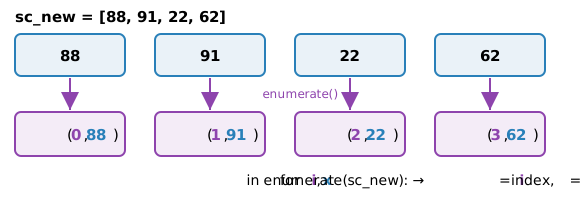
🟣 index (0,1,2,…) · 🔵 value — for i, x แตก tuple ออกเป็น 2 ตัวแปรอัตโนมัติ
For-loop กับ Tuple
For-loop กับ Set
Warning
Set ไม่รับประกันลำดับ — ผลลัพธ์อาจเรียงต่างจากนี้ และค่าซ้ำ ('Barcelona') จะถูกตัดเหลือตัวเดียว
For-loop กับ Set : enumerate
Note
ทบทวน: Set (Module 4)
For-loop กับ Dictionary
สร้าง dictionary person แล้ววน — ตัวแปรในลูปคือ key
Note
ทบทวน: Dictionary (Module 4)
เห็นภาพ: วน for บน Dictionary ได้อะไร
วน for k in person → k เป็น key · อยากได้ value ต้อง person[k] · อยากได้ทั้งคู่ใช้ .items()
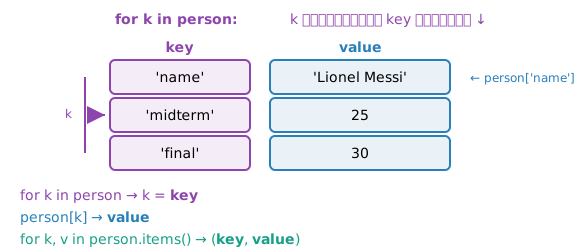
Dictionary : key, value, index
Collection หลายมิติ 🧊
List of Dict และ Dict of List
List of Dict
List of Dict คือ List ที่มีสมาชิกเป็น Dictionary
เห็นภาพ: เข้าถึง List of Dict 2 ชั้น
students[1]["height"] — ชั้นแรก index เลือก dict · ชั้นสอง key เลือก value
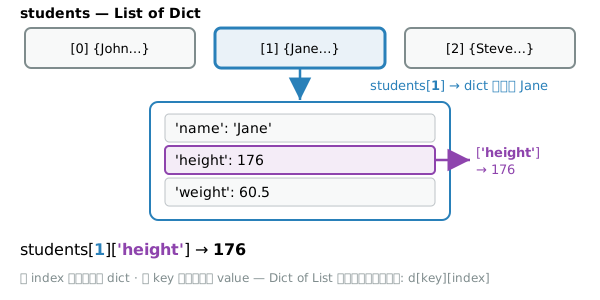
โจทย์ #5: หาคนที่สูงที่สุด
จาก students แสดงชื่อและความสูงของทุกคน แล้วบอกว่าใครสูงที่สุด
- แต่ละคน →
(ชื่อ) is (ความสูง) cm tall. - สุดท้าย →
The tallest person in the group is (ชื่อ) with the height of (ความสูง) cm.
คิดก่อน: ต้องใช้ตัวแปร “เก็บค่าสูงสุด” และ “เก็บชื่อ” เริ่มต้นเป็นค่าใด?
โจทย์ #5: หาคนที่สูงที่สุด (ต่อ)
โจทย์ #6: คำนวณ BMI
คำนวณ BMI ของทุกคน แล้วเพิ่ม key 'bmi' เข้าไปในแต่ละ dictionary
\[\mathsf{BMI} = \frac{\text{น้ำหนัก (kg)}}{\left(\dfrac{\text{ส่วนสูง (cm)}}{100}\right)^2}\]
ปัดเป็นทศนิยม 2 ตำแหน่ง
Note
ทบทวน: Arithmetic / ** (Module 3)
โจทย์ #6: คำนวณ BMI (ต่อ)
Dict of List
Dict of List คือ dictionary ที่มี value เป็น list
โจทย์ #7: หาคนที่หนักที่สุด
จาก persons แสดงชื่อและน้ำหนักของทุกคน แล้วบอกว่าใครหนักที่สุด
- แต่ละคน →
(ชื่อ) is (น้ำหนัก) kg. - สุดท้าย →
The heaviest person in the group is (ชื่อ) with the weight of (น้ำหนัก) kg.
คิดก่อน: น้ำหนักเก็บอยู่ที่ index ใดของ list ที่เป็น value? (["male", 180.5, 80])
โจทย์ #7: หาคนที่หนักที่สุด (ต่อ)
Summary 🎯
สรุป Module 8 🎉
ทบทวน Collections
- List —
.append().insert().remove().pop()· slice[start:stop:step] - Tuple — แก้ไขไม่ได้ ·
tuple()/list() - Dictionary —
key:value·.pop().keys().items()
Loop สร้าง index
- While — ตั้งต้น / condition / อัพเดท
- For +
range(start,stop,step)
For-loop เข้าถึงข้อมูลตรง
for x in collection— ได้ item ทีละตัวenumerate()— ได้(index, value)- ใช้ได้กับ List / Tuple / Set / Dict
Collection หลายมิติ
- List of Dict —
s['key'] - Dict of List —
d[key][index]
Tip
loop + condition ช่วยกรอง/นับ/ค้นหาข้อมูลใน collection ได้สะดวก
Note
ต่อ Module 9: Functions 👉
🏠 259201 — Module 8 | ภาควิชาวิศวกรรมคอมพิวเตอร์ คณะวิศวกรรมศาสตร์ มหาวิทยาลัยเชียงใหม่