Module 5

Conditions (Control Structure 1)

วันนี้เราจะเรียนรู้ 🚀

  1. Flowchart ผังงานในการเขียนโปรแกรม
  2. การเขียนโปรแกรมแบบมีทางเลือก และรูปแบบเงื่อนไข
  3. การใช้ in operator
  4. if, if-else, if-elif-else
  5. Nested if
year = int(input("Enter student year: "))
if year == 1:
    print("Freshman")
elif year == 2:
    print("Sophomore")
elif year == 3:
    print("Junior")
elif year == 4:
    print("Senior")
else:
    print("Super")

Flowchart 📊

ผังงาน — เครื่องมืออธิบายลำดับความคิดและตรรกะของโปรแกรม

Flowchart คืออะไร?

  • Flowchart คือเครื่องมือที่ช่วยอธิบายลำดับความคิดและแสดงตรรกะของผู้เขียนโปรแกรมต่อผู้อ่านโปรแกรม
  • มีลักษณะเป็นแผนภาพแสดงการทำงานของโปรแกรม
    • แสดงลำดับ (Sequence)
    • แสดงทางเลือก (Selection)
    • แสดงการทำซ้ำ (Iteration)
  • Flowchart เปรียบเสมือนการเขียนแบบแปลนของอาคาร ก่อนที่จะลงมือก่อสร้าง

Tip

ในการพัฒนาโปรแกรมควรมี Flowchart ก่อนลงมือเขียนโปรแกรม โดยเฉพาะเมื่อโปรแกรมมีความซับซ้อน หรือมีผู้ร่วมพัฒนาหลายคน

Flowchart : Symbols

Symbol Meaning
Terminal — จุดเริ่มต้น หรือจุดสิ้นสุดของโปรแกรม
Process — การประมวลผลทั่วไป เช่น การคำนวณ หรือการกำหนดค่า
Input/Output — การรับค่าเข้าสู่โปรแกรม หรือการแสดงผลลัพธ์
Decision — คำสั่งที่ต้องตัดสินใจ มีทางเลือกสองทาง (True / False)
Connector — แสดงจุดเชื่อมของโปรแกรม

Flowchart : Symbols (ต่อ)

Symbol Meaning
Link — เชื่อมต่อระหว่างส่วนของโปรแกรม (เช่น ข้ามหน้ากระดาษ)
Function — ส่วนของ Function ที่เรียกใช้ (รายละเอียดอยู่ที่อื่น)
Flow line — ทิศทางการทำงาน เรียงจากบนลงล่าง
Loop arrow — ลูกศรล่างขึ้นบน แสดงการทำซ้ำ/วนลูป

Flowchart

การนำรถยนต์เข้าศูนย์บริการ

  • ตรวจสอบข้อมูลอายุรถยนต์ (Age) และระยะทางที่รถวิ่งมาแล้ว (Mileage)
  • พิจารณาเงื่อนไขว่ารถมีอายุมากกว่า 2 ปี หรือ มีระยะทางมากกว่า 200,000 กม. หรือไม่
  • หากเงื่อนไขอันใดอันหนึ่งจริง → นำรถเข้าศูนย์ฯ
  • หากไม่จริงทั้ง 2 อย่าง → ไม่นำรถเข้าศูนย์ฯ

การเลือกและการสร้างเงื่อนไข 🔀

Selection & Condition

การเลือกและการสร้างเงื่อนไข

  • โดยทั่วไปชุดคำสั่ง (Statement) จะทำงานเรียงตามลำดับก่อนหลัง (Sequence) จากบรรทัดบนลงล่าง
  • แต่บางครั้งจำเป็นต้องมี ทางเลือก (Selection) โดยอาศัย เงื่อนไข (Condition) ในการพิจารณา

เงื่อนไข สร้างขึ้นจากคำสั่ง 2 ลักษณะประกอบกัน

  • Relational Expression — การเปรียบเทียบ
  • Logical Expression — การคำนวณทางตรรกะ

Relational Expression

การประเมิน (Evaluate) ความสัมพันธ์เชิงเปรียบเทียบ (comparison) ว่าเป็นไปตามที่กำหนดหรือไม่

Relational Operator ความหมาย
< น้อยกว่า
> มากกว่า
<= น้อยกว่าหรือเท่ากับ
>= มากกว่าหรือเท่ากับ
== เท่ากับ
!= ไม่เท่ากับ

ตัวอย่าง

age < 18
temp >= 38.3
Grade != 0

Note

ตัวอย่าง Relational Expression

ผลลัพธ์ของการเปรียบเทียบเป็นค่า bool (True / False)

temp = 40
temp == 40
True
grade = "A"
grade != "F"
True

โจทย์ #1

รับค่า age แล้วตรวจสอบว่าน้อยกว่า 18 หรือไม่ แสดงผลด้วย f-string

age = int(input('Age: '))    # สมมติป้อน 15
print(f'age < 18: {age < 18}')
age < 18: True

การใช้งานที่ไม่ถูกต้อง

Warning

ระวังการเขียน Relational Operator ผิดรูปแบบ

a =< b        # ลำดับสลับ (ต้องเป็น <=)
a < = b       # ห้ามมีช่องว่างคั่น
a >> b        # กลายเป็น shift expression
a = b         # นี่คือ assignment ไม่ใช่การเปรียบเทียบ
a = = b-1     # ห้ามมีช่องว่างคั่น (ต้องเป็น ==)

การใช้ in และ not in Operator

ใช้ in และ not in ตรวจสอบความเป็นสมาชิก (membership test) ว่าข้อมูลอยู่ภายใน collection หรือไม่

>>> 5 in [2,3,4,5,9,7]
True
>>> "Ann" in ["John","James","Ken","Annie"]
False
>>> 10 in (5,10,15,20,25,30)
True
>>> "d" in "Dome Potikanond"
True

Note

โจทย์ #2

กำหนดลิสต์ Blackpinks แล้วตรวจสอบว่าชื่อที่รับเข้ามาเป็นสมาชิกหรือไม่

ลองใช้ in กับ string เพื่อตรวจสอบ substring ด้วย

Blackpinks = ["Jisoo","Rose","Jennie","Lisa"]
name = 'Lisa'
print(f'{name} is in Blackpink: {name in Blackpinks}')

greeting = "Hi, welcome to Real Python!"
print("Hello" in greeting)
print("welcome" in greeting)
Lisa is in Blackpink: True
False
True

Logical Expression

การประเมินความสัมพันธ์ทาง ตรรกะ (Logic) โดยอาศัย Logical Operators

Logical Operator ความหมาย
not ค่าตรงกันข้าม
and เป็นจริง ถ้าค่าทั้งสองเป็นจริง
or เป็นจริง ถ้าอย่างน้อยค่าใดค่าหนึ่งเป็นจริง

Note

ทบทวน: Logical Operators (Module 3)

ตารางค่าความจริง (Truth Table)

การประเมินค่าทางตรรกะของ and, or, not

A B A and B A or B not A
True True True True False
True False False True False
False True False True True
False False False False True

โจทย์ #3

แต่ละนิพจน์จะได้ True หรือ False?

print('1.', x > y)                              # True
print('2.', 5*x < y)                            # False
print('3.', x > y or ("Messie" in Blackpinks))  # True
print('4.', x < y or ("Chanatip" in Blackpinks))# False
print('5.', y**2 == len(Blackpinks) and True)   # True
print('6.', False and "Python" in greeting)     # False
1. True
2. False
3. True
4. False
5. True
6. False

พักสมอง 😄

การเขียน เงื่อนไข ก็เหมือนเลือกทางเดินให้โปรแกรม 🛣️

ภาพ: Fork in the road · Public Domain (CC0 1.0)

คำสั่ง if ❓

การสร้างทางเลือกด้วยเงื่อนไข

Flowchart: if

  • การใช้ if อย่างง่ายที่สุด จะประเมินชุดคำสั่งที่เป็น condition
  • หากเงื่อนไขเป็น True จึงเข้าไปทำงานที่ statement แล้วทำงานต่อที่ next-statement
  • หากเป็น False จะข้ามไปทำงานที่ next-statement ทันที
  • statement ต้อง ย่อหน้า

โจทย์ #4: if

โปรแกรมคำนวณหา ค่าสัมบูรณ์ (Absolute value) ของจำนวนเต็ม (ห้ามใช้คำสั่ง abs())

คิดก่อน: ต้องตรวจเงื่อนไขใด แล้วทำอะไรเมื่อเงื่อนไขเป็นจริง?

number = int(input("Enter your number:"))   # สมมติป้อน -7
if number < 0:
    number = -number
print("The absolute value is", number)
The absolute value is 7

if กับ membership test

ใช้ if ร่วมกับ in เพื่อทำงานเมื่อข้อมูลเป็นสมาชิกของ collection

Blackpinks = ["Jisoo","Rose","Jennie","Lisa"]
name = 'Lisa'
if name in Blackpinks:
    print(f'{name} is a Blackpink member.')
print('end-of-script')
Lisa is a Blackpink member.
end-of-script

การใช้คำสั่ง if (Compound Statement)

  • ถ้า condition เป็น True จะทำงานในทุก ๆ statement แล้วจึงไปทำงานที่ next-statement
  • หากเป็น False จะข้ามไปทำงานที่ next-statement
  • อาศัยการย่อหน้า (Indent) ในการกำหนดขอบเขตของ Compound Statement

โจทย์ 5: if (Compound Statement)

จากโจทย์ 4 — หากอินพุตน้อยกว่าศูนย์ ให้คำนวณค่าสัมบูรณ์ และเพิ่มค่าขึ้นไปอีก 10

\[\mathsf{number} = \begin{cases} \lvert \mathsf{number} \rvert + 10, & \text{if } \mathsf{number} < 0 \\ \mathsf{number}, & \text{if } \mathsf{number} \geq 0 \end{cases}\]

คิดก่อน: มีกี่ statement อยู่ภายใต้ if และต้องย่อหน้าอย่างไร?

number = int(input("Enter your number:"))   # สมมติป้อน -7
if number < 0:
    number = -number
    number = number + 10
print("The absolute value is", number)  # next-statement
The absolute value is 17

if (Compound) กับ membership test

Blackpinks = ["Jisoo","Rose","Jennie","Lisa"]
name = 'Lisa'

if name in Blackpinks:
    print(f'{name} is a Blackpink member.')
    print(f'{name} is number {Blackpinks.index(name) + 1} in Blackpink.')

print('end-of-script')                  # next-statement
Lisa is a Blackpink member.
Lisa is number 4 in Blackpink.
end-of-script

คำสั่ง if-else ⚖️

สองทางเลือก

การใช้คำสั่ง if-else

  • หาก condition เป็น True จะทำงาน statement 1, 2, …
  • หาก condition เป็น False จะทำงาน statement 3, 4, …
  • จากนั้นจึงทำงานใน next-statement

โจทย์ 6: if-else

โปรแกรมแปลงอุณหภูมิระหว่างเซลเซียสและฟาเรนไฮต์ ตามหน่วยที่ผู้ใช้เลือก

คิดก่อน: ถ้าผู้ใช้พิมพ์ "f" กับ "F" จะให้ผลเหมือนกันหรือไม่?

temp = float(input("Enter temperature: "))                # สมมติ 100
temp_type = input("Enter f (Fahrenheit) or c (Celsius): ") # สมมติ f

if temp_type == "f":
    c = (5.0/9) * (temp - 32)
    print(f"The equivalent Celsius temp is {c:.2f}")
else:
    f = (9.0/5) * temp + 32
    print(f"The equivalent Fahrenheit temp is {f:.2f}")

print('end-of-script')
The equivalent Celsius temp is 37.78
end-of-script

Note

if-else กับ membership test

Blackpinks = ["Jisoo","Rose","Jennie","Lisa"]
name = 'Somchai'

if name in Blackpinks:
    print(f'{name} is a Blackpink member.')
    print(f'{name} is number {Blackpinks.index(name) + 1} in Blackpink.')
else:
    print(f'Sorry, {name} is NOT a Blackpink member.')

print('end-of-script')
Sorry, Somchai is NOT a Blackpink member.
end-of-script

คำสั่ง if-elif-else 🪜

มากกว่าสองทางเลือก

การใช้คำสั่ง if-elif-else

  • ใช้ในกรณีที่ต้องการตรวจสอบเงื่อนไขมากกว่าหนึ่ง condition
  • ใช้ elif (ย่อจาก else if) ในการตรวจสอบ condition ต่อ ๆ มา ทำให้สร้างทางเลือกได้มากกว่า 2 ทาง
  • else ต้องอยู่สุดท้ายเท่านั้น และสามารถละไม่มี else ก็ได้

โจทย์ 7: if-elif-else

จงเขียนโปรแกรมแสดงข้อความตามชั้นปีของนักศึกษา

  • ชั้นปี 1 → Freshman
  • ชั้นปี 2 → Sophomore
  • ชั้นปี 3 → Junior
  • ชั้นปี 4 → Senior
  • ชั้นปีอื่น ๆ → Super

โจทย์ 7: if-elif-else (ต่อ)

จงเขียนโปรแกรมแสดงข้อความตามชั้นปีของนักศึกษา

year = int(input("Enter student year: "))   # สมมติป้อน 3
if year == ___:
    print("Freshman")
elif year == ___:
    print("Sophomore")
elif year == ___:
    print("Junior")
elif year == ___:
    print("Senior")
else:
    print("Super")
Junior

ข้อสังเกต: ตัดสินใจเป็นชั้น ๆ {#m5-elif-layered .smaller

if-elif-else ทำงานเหมือน การกรองเป็นชั้น ๆ — ข้อมูลไหลผ่านลงมา ตรวจทีละชั้นจนกว่าจะถูก “ดัก” ไว้

  • ตรวจเงื่อนไขเรียงจาก บนลงล่าง ตามลำดับ
  • ชั้นไหน จริงก่อน → ทำงานชั้นนั้น แล้ว ข้ามที่เหลือทั้งหมด
  • ทุกทางเลือกจึง เลือกได้ทางเดียว ไม่ทับซ้อนกัน
  • else คือ ตาข่ายชั้นล่างสุด ที่รับทุกกรณีซึ่งไม่เข้าชั้นใดด้านบน
year == 1 ? → Freshman
↓ ไม่จริง
year == 2 ? → Sophomore
↓ ไม่จริง
year == 3 ? → Junior
↓ ไม่จริง
year == 4 ? → Senior
↓ ไม่จริง
else → Super

Tip

ถ้าเขียน if แยกหลายอัน โปรแกรมจะตรวจ ทุกเงื่อนไข; แต่ if-elif-else จะ หยุดทันที ที่เจอเงื่อนไขจริง — สื่อความหมาย “เลือกทางเดียว” และทำงานน้อยขั้นกว่า

if แยกกัน vs if-elif: ต่างกันมาก!

score = 85 — เขียนต่างกันนิดเดียว แต่ผลลัพธ์ grade ต่างกัน!

if แยก 3 อัน — ตรวจครบทุกอัน
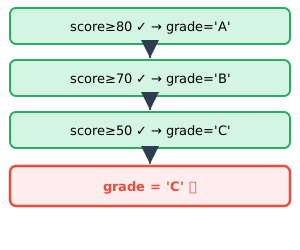
score≥80 ✓ → grade='A' score≥70 ✓ → grade='B' score≥50 ✓ → grade='C' grade = 'C' ❌

ตรวจครบ 3 อัน → ทับค่าจนเหลือ 'C' (ผิด!)

if-elif-else — หยุดที่เจอตัวแรก
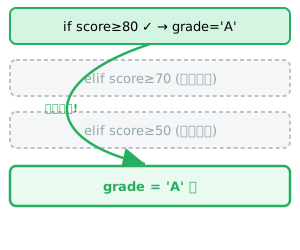
if score≥80 ✓ → grade='A' elif score≥70 (ข้าม) elif score≥50 (ข้าม) หยุด! grade = 'A' ✅

เจอ ≥80 ก่อน → 'A' แล้ว ข้ามที่เหลือ (ถูก!)

Important

if แยกกัน = ตรวจ ทุกเงื่อนไข (อาจทำหลายอัน/ทับค่า) · if-elif = หยุดทันทีที่เจอจริง → เลือกทางเดียว

Nested if 🪆

เงื่อนไขซ้อนเงื่อนไข

การใช้คำสั่ง Nested if

  • Nested if เป็นการเขียนโปรแกรมที่มีการใช้ if ซ้อนกันหลายชั้น เพื่อแสดงการกระทำแบบเงื่อนไขซ้อนเป็นชั้น ๆ
  • ให้มองว่า if, if-else, หรือ if-elif-else ที่อยู่ภายใน เป็น 1 statement

โจทย์ 8: Nested if

รับเลขจำนวนเต็ม 2 จำนวน (คั่นด้วยช่องว่าง) แล้วตรวจสอบว่า

  • เลขตัวแรก อยู่ในช่วง 0-9
  • เลขตัวที่สอง อยู่ในช่วง 10-99

คิดก่อน: ต้องใช้ if ซ้อนกันกี่ชั้น เพื่อครอบคลุมทุกกรณี?

โจทย์ 8: Nested if (ต่อ)

print("Check if num1 is in [0-9] and num2 is in [10-99].")
num1, num2 = input("num1 and num2: ").split()   # สมมติป้อน 5 42
num1 = int(num1); num2 = int(num2)

if num1 >= 0 and num1 <= 9:
    if num2 >= 10 and num2 <= 99:
        print("Both numbers are entered correctly.")
    else:
        print("Only num1 is entered correctly.")
else:
    if num2 >= 10 and num2 <= 99:
        print("Only num2 is entered correctly.")
    else:
        print("Both numbers are NOT entered correctly.")
Check if num1 is in [0-9] and num2 is in [10-99].
Both numbers are entered correctly.

โจทย์ #9: ชวนคิด

วิเคราะห์รหัสนักศึกษา CMU: คำนวณชั้นปีจาก 630610xxx (ปกติ) หรือ 630615xxx (อินเตอร์)

คิดก่อน: ต้องใช้ if กี่ที่ดี ใช้ elif หรือ else ด้วยไหม?

คิดก่อน: การ slice string เช่น id[0:2], id[2:4], id[4:6] ดึงข้อมูลส่วนใดบ้าง?

เห็นภาพ: slice รหัสนักศึกษา

id = '630610123' — ใช้ slice แยกส่วนต่าง ๆ ของรหัสออกมา (แต่ละส่วนคือ substring)
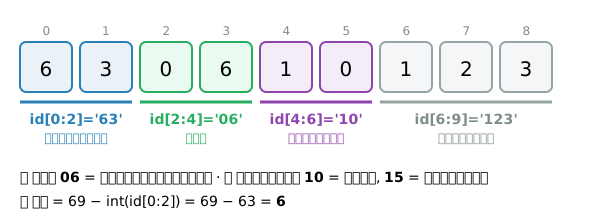
012345678 6 3 0 6 1 0 1 2 3 id[0:2]='63'ปีที่เข้า id[2:4]='06'คณะ id[4:6]='10'หลักสูตร id[6:9]='123'เลขลำดับ 🟢 คณะ 06 = วิศวกรรมศาสตร์ · 🟣 หลักสูตร 10 = ปกติ, 15 = อินเตอร์ 🔵 ปี = 69 − int(id[0:2]) = 69 − 63 = 6

โจทย์ #9: ชวนคิด (ต่อ)

id = input('Enter CMU student id: ')   # สมมติป้อน 630610123
invalid_id = False

year = 69 - int(id[0:2])

if year > 0 and year <= 8:
    if id[2:4] == "06":
        if id[4:6] == "10":
            program = "Engineering"
        elif id[4:6] == "15":
            program = "international Engineering"
        else:
            invalid_id = True
else:
    invalid_id = True

if invalid_id:
    print('Your student ID is NOT valid.')
else:
    print(f'You are a {year}-year student of {program} program.')
You are a 6-year student of Engineering program.

Summary 🎯

สรุป Module 5 🎉

Flowchart

  • ผังภาพแสดงการทำงานของโปรแกรมแบบลำดับ / ทางเลือก / ทำซ้ำ
  • ช่วยเข้าใจโปรแกรมที่ซับซ้อนก่อนลงมือเขียน

เงื่อนไข (Condition)

  • Relational< > <= >= == !=
  • Logicaland or not
  • in / not in — membership test

คำสั่งสร้างทางเลือก

  • if — ทำเมื่อเงื่อนไขจริง
  • if-else — สองทางเลือก
  • if-elif-else — มากกว่าสองทางเลือก
  • Nested if — เงื่อนไขซ้อนกัน

Tip

อาศัยการย่อหน้า (Indent) กำหนดขอบเขตของ Compound Statement

โจทย์ #10: ชวนคิดอีก

จงหาค่าความจริงของนิพจน์ต่อไปนี้ (True / False) เมื่อ

i = 3; k = 5; j = 0; m = -2

คิดก่อน: ลองคำนวณในใจก่อน แล้วตรวจคำตอบใน Live Code

i = 3; k = 5; j = 0; m = -2
print('1.', j >= 0)                      # True
print('2.', (i>0) and (not i>0))         # False
print('3.', (i>0) or (not i>0))          # True
print('4.', not ((k<=1) or (k>=10)))     # True
print('5.', (j>k) or (not m<i))          # False
print('6.', 3*i - 4%2/k < 2+m)           # False
1. True
2. False
3. True
4. True
5. False
6. False