Module 3a
Variables and Types, Operators, Math
วันนี้เราจะเรียนรู้ 🚀
- โครงสร้างของโปรแกรม Python
- ตัวแปร (Variables) และ ชนิดข้อมูล (Data Types)
- ตัวดำเนินการ (Operators)
- Math Module
Note
Input / Output และ f-string ต่อใน Module 3b 👉
Example of Python Script 🐍
โครงสร้างของโปรแกรม Python
ตัวอย่างโปรแกรม Python
# นำเข้าคำสั่งภายนอก (bring in external functions)
import datetime

print("----- Age Calculate Program -----")
# รับค่าอินพุตนำไปกำหนดค่าตัวแปร (get input, store in a variable)
yob = input("What's your year of birth? (e.g., 2004): ")

# ประมวลผล (process data using variables)
today = datetime.date.today()       # ดึงค่า วัน-เวลา ปัจจุบัน
year = today.year                   # สนใจเฉพาะ ปี ปัจจุบัน
age = year - int(yob)               # คำนวณอายุ

# แสดงผล (display output)
print("You are", age , "years old.")
print()
print("Congratulations on your first Python program.")
Variables 📦
ตัวแปร — การกำหนดชื่อให้พื้นที่ในหน่วยความจำ
ตัวแปร (Variables) คืออะไร?
- ตัวแปร = ชื่อที่ใช้อ้างอิงพื้นที่ในหน่วยความจำ
- ใช้เก็บข้อมูลเพื่อนำไปใช้งานภายหลัง
- ควรตั้งชื่อให้ สอดคล้องกับข้อมูล ที่จัดเก็บ
กฎการตั้งชื่อ Python Identifier
- ใช้ตัวอักษร
a-z,A-Zและ_(underscore) - เช่น
var_1print_this_to_screen - ห้ามขึ้นต้นด้วยตัวเลข —
1variableใช้ไม่ได้ - ห้ามใช้เครื่องหมายพิเศษ —
!,@,#,$,% - ห้ามตั้งชื่อตรงกับ Keyword ของ Python
Warning
Case-sensitive — var กับ Var เป็นคนละตัว
Python Keywords
คำเหล่านี้ ห้ามใช้เป็นชื่อตัวแปร
Data Types 🏷️
ชนิดข้อมูลพื้นฐาน — str, int, float, bool
ชนิดข้อมูลพื้นฐาน 4 ประเภท
| ชนิด | คำอธิบาย | ตัวอย่าง |
|---|---|---|
str |
ข้อความ (string) | 'hello', "2345" |
int |
เลขจำนวนเต็ม | 50000, 1_000_000 |
float |
เลขทศนิยม | 3.14, 1.23e9 |
bool |
ค่าความจริง | True, False |
โจทย์ #1
สร้างตัวแปรชื่อ var1 เพื่อเก็บค่า ผลคูณ ของ 100 กับ 2 แล้ว แสดงผล
Note
วิธีคิด
- สร้างตัวแปรชื่อ
var1 - assign ค่า 100*2 ให้กับ
var1 - แสดงผล
var1ด้วยคำสั่งprint
โจทย์ #2
สร้างตัวแปรชื่อ var2 เพื่อเก็บค่า ผลบวก ของ 1,000,000 กับ 1 แล้ว แสดงผล
โจทย์ #3
สร้างตัวแปรชื่อ var3 เพื่อเก็บค่าของ 10 หาร ด้วย 2 แล้ว แสดงผล
คิดก่อน: var3 จะเป็น int หรือ float?
Note
วิธีคิด
- สร้างตัวแปรชื่อ
var3 - assign ค่า 10/2 ให้กับ
var3 - แสดงผล
var3ด้วยคำสั่งprint
โจทย์ #4
สร้างตัวแปรชื่อ s1 เพื่อเก็บข้อความ "this is a string" แล้ว แสดงผล
ข้อความ (String) — เครื่องหมาย Quote
ข้อความ (String) ต้องอยู่ภายใต้เครื่องหมาย quote
| Quote | ใช้เมื่อ | ตัวอย่าง |
|---|---|---|
'...' |
ข้อความทั่วไป | 'hello' |
"..." |
มี apostrophe ในข้อความ | "isn't" |
'''...''' |
ข้อความหลายบรรทัด | '''line1\nline2''' |
โจทย์ #5
แสดงผลข้อความ this is a simple string.
คิดก่อน: ใช้คำสั่งอะไรในการแสดงผล?
โจทย์ #6
แสดงผลข้อความ this isn't a simple string.
คิดก่อน: ใช้ ' ' ได้ไหม?
โจทย์ #7
แสดงผลข้อความ this is how to print "double quote" in sentence.
โจทย์ #8
แสดงผลข้อความ 3 บรรทัด ดังนี้
this is another string
this is 2nd line
this is 3rd lineEscape Code — อักขระพิเศษ
- ในภาษาคอมพิวเตอร์ มักมีการใช้งานอักขระพิเศษร่วมกับข้อความ (string) เพื่อให้เกิดการแสดงผลแบบต่าง ๆ เช่น การขึ้นบรรทัดใหม่ การแท็บ การลบอักขระ
- อักขระเหล่านี้
- ขึ้นต้นด้วย Escape Character (
\) - ใช้ภายใน
" ",' 'หรือ''' '''
- ขึ้นต้นด้วย Escape Character (
- ที่ใช้งานบ่อย ๆ ได้แก่
\n,\t
| Escape Code | Description |
|---|---|
\n |
newline (ขึ้นบรรทัดใหม่) |
\r |
carriage return |
\t |
tab (แท็บ) |
\v |
vertical tab |
\b |
backspace |
| Escape Code | Description |
|---|---|
\f |
form feed (page feed) |
\a |
alert (beep) |
\' |
single quote (') |
\" |
double quote (") |
\\ |
backslash (\) |
ตัวอย่างการใช้ Escape Code
Dynamic Typing — ชนิดข้อมูลไม่ตายตัว
Python ไม่บังคับ ชนิดข้อมูลตายตัว (ต่างจาก C/C++, Java) ตัวแปรสามารถเปลี่ยนไปเก็บข้อมูลชนิดอื่นได้อัตโนมัติ (dynamic typing)
ตรวจสอบชนิดด้วย type()
พักสมอง 😄
ที่มา: xkcd #353 — “Python” (CC BY-NC 2.5)
โจทย์ #9
1.234 และ 1.23e11 เป็นข้อมูลประเภทใด?
โจทย์ #10
สร้างตัวแปร s2 เก็บผลบวกของ 2500 กับ 1000 แล้วแสดงค่า s2 และตรวจสอบ type
คิดก่อน: s2 จะเป็นชนิดใด?
โจทย์ #11
ต่อจากข้อก่อน — หาค่า s2 หารด้วย 2 แล้วเก็บกลับใน s2
คิดก่อน: s2 จะเป็นชนิดใด?
โจทย์ #12
สร้างตัวแปร s3 เก็บผลบวกของข้อความ 'hello' กับ 'there' (เว้นวรรคด้วย)
คิดก่อน: s3 จะเป็นชนิดใด?
โจทย์ #13: ชวนคิด
ทดลองหาผลบวกของ s3 (string) กับ 1 (int)
คิดว่าบวกกันได้ไหม?
Type Conversions 🔄
การเปลี่ยนชนิดข้อมูล — int(), float(), str()
ฟังก์ชันแปลงชนิดข้อมูล
| ฟังก์ชัน | แปลงเป็น |
|---|---|
int() |
จำนวนเต็ม |
float() |
ทศนิยม |
str() |
ข้อความ |
bool() |
True/False |
Note
Automatic conversion: int + float → Python แปลง int เป็น float ให้อัตโนมัติ
โจทย์ #14
99 (int) + 1.23 (float) → ผลลัพธ์เป็น type อะไร?
Note
แล้ว 4 กับ 4.00 เป็น type เดียวกันหรือไม่🤔
โจทย์ #15
หาผลบวกของ 42 กับ 3.5 แล้วเก็บเป็น integer ในตัวแปร i
โจทย์ #16
แปลงตัวแปร i จาก integer ให้เป็น float
โจทย์ #17
กำหนด s = '1234' (string) — แปลงเป็น integer แล้วแสดงผล
โจทย์ #18
กำหนด str1 = '1234.50' — หาผลบวกของ str1 กับ 1000 เก็บในตัวแปร x
ลองคิด: จะแปลง str1 เป็น int หรือ float ดี?
โจทย์ #19: ชวนคิด
แปลง string 'Hello' เป็น integer ได้หรือไม่?
Operators ➕
ตัวดำเนินการ — Arithmetic, Comparison, Logical, Assignment
Operator คืออะไร?
- Operator คือสัญลักษณ์ที่แทนการคำนวณต่าง ๆ
- ข้อมูลที่ operator ใช้ในการคำนวณเรียกว่า operand
เลือกใช้ Operator ให้สอดคล้องกับชนิดข้อมูล
number+number→ ได้ตามหลักคณิตศาสตร์string+string→ นำข้อความมา เรียงต่อกัน (concatenation)string+number→ ไม่ได้! จะเกิดTypeError
Arithmetic Operators
กำหนด x = 16, y = 4
| Operator | ความหมาย | ผลลัพธ์ |
|---|---|---|
x + y |
บวก | 20 |
x - y |
ลบ | 12 |
x * y |
คูณ | 64 |
x / y |
หาร (ได้ float เสมอ) | 4.0 |
x // y |
หารปัดเศษทิ้ง (floor division) | 4 |
x % y |
เศษของการหาร (modulus) | 0 |
x ** y |
ยกกำลัง | 65536 |
โจทย์ #20
แบ่งคนในห้อง 85 คน ออกเป็น 7 กลุ่ม — เหลือเศษกี่คน?
โจทย์ #21
แบ่งคนในห้อง 85 คน เป็นกลุ่มละ 12 คน — ได้กี่กลุ่มที่มีสมาชิกครบ?
โจทย์ #22
คำนวณ \(x^y\) เมื่อ \(x = 33\), \(y = 1.5\)
Tip
ทศนิยมเยอะไปไหม ถ้าต้องการทศนิยม 2 ตำแหน่งล่ะ🤔 ทำแบบนี้เลย…
อยากรู้เพิ่ม 👉 ดูที่หัวข้อ f-string
Comparison Operators
ให้ผลลัพธ์เป็น True หรือ False — กำหนด x = 10, y = 12
| Expression | ผลลัพธ์ |
|---|---|
x > y |
False |
x < y |
True |
x >= y |
False |
x <= y |
True |
| Expression | ผลลัพธ์ |
|---|---|
x == y |
False |
x != y |
True |
Warning
== เปรียบเทียบ = กำหนดค่า (assign) อย่าสับสน!
Note
True กับ False เป็นข้อมูล type ไหน🤔
โจทย์ #23
กำหนด x=10, y=12 — ประโยค x > y และ x < y เป็นจริงหรือเท็จ? และเป็น type ไหน
โจทย์ #24
จากข้อก่อน — จะตรวจสอบว่า
xเท่ากับyหรือไม่?xไม่เท่ากับyหรือไม่?
Note
ผลของ comparison operator ได้ตรรกะ True หรือ False แสดงว่าต้องมี operator ที่ใช้กระทำทางตรรกะแน่ ๆ เลย (👉 ดูหน้าต่อไป)
Logical Operators
ใช้รวมเงื่อนไขหลายตัวเข้าด้วยกัน
and— ทั้งคู่ต้องTrueor— แค่ตัวใดตัวหนึ่งTruenot— กลับค่า
Note
👉 ใน Module 3 เราเจอ Logical Operators แค่นิดเดียว — แต่จะได้ใช้งานจริงจังมากใน Module 5 (if) และ Module 6 (while loop) ตอนสร้าง เงื่อนไข control flow 🔀
โจทย์ #25
กำหนด x = True, y = False — หาค่า x and y, x or y, not y
Assignment Operators
แบบพื้นฐาน — กำหนดค่า (=) 📌
ตัวย่อ — assign + คำนวณในตัวเดียว ⚡
| ตัวย่อ | เทียบเท่ากับ | ผลลัพธ์ (คิดจาก x = 10) |
|---|---|---|
x += 5 |
x = x + 5 |
x = 15 |
x -= 3 |
x = x - 3 |
x = 7 |
x *= 2 |
x = x * 2 |
x = 20 |
x /= 4 |
x = x / 4 |
x = 2.5 |
x **= 2 |
x = x ** 2 |
x = 100 |
x //= 4 |
x = x // 4 |
x = 2 |
x %= 3 |
x = x % 3 |
x = 1 |
ตัวย่อช่วยให้เขียนสั้นลง 👉 x += 5 มีความหมายเหมือน x = x + 5
อ่านว่า: “เอาค่า x เดิม มาบวก 5 แล้วเก็บกลับเข้า x”
ดังนั้นต้องมี x = 10 (กำหนดค่าเริ่มต้น) มาก่อนเสมอ ไม่งั้นจะไม่มีค่าเดิมให้บวกเพิ่ม
Operator Precedence (ลำดับความสำคัญ)
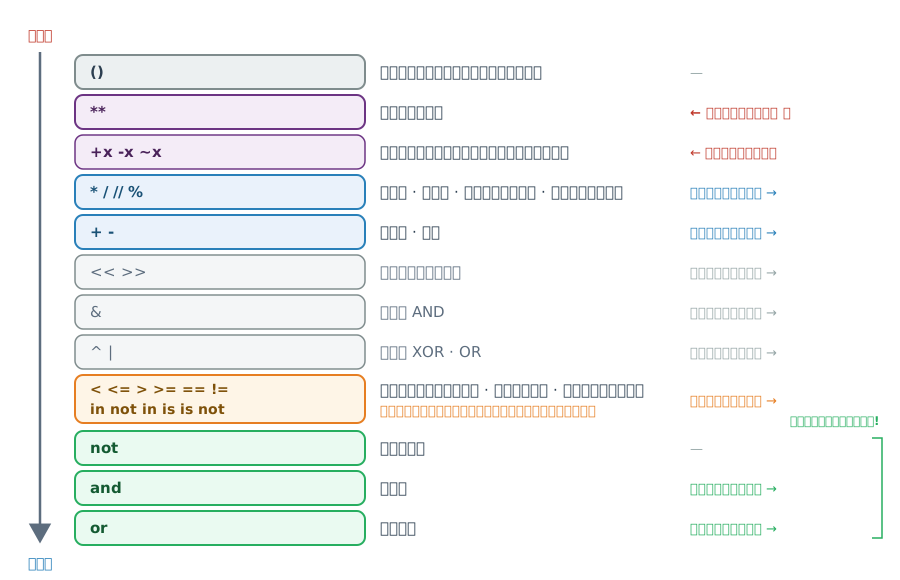
Operator Precedence — ตาราง
ลำดับจาก สูงสุด → ต่ำสุด
| Operators | Description | Associativity (การจับคู่) |
|---|---|---|
() |
Parentheses | — |
** |
Exponentiation (raise to the power) | ขวา → ซ้าย ⭐ |
+x, -x, ~x |
Unary plus, Unary minus, Bitwise NOT | ขวา → ซ้าย |
*, /, //, % |
Multiplication, Division, Floor division, Modulus | ซ้าย → ขวา |
+, - |
Addition, subtraction | ซ้าย → ขวา |
<<, >> |
Bitwise shift operators |
ซ้าย → ขวา |
& |
Bitwise AND |
ซ้าย → ขวา |
^, \| |
Bitwise XOR and OR |
ซ้าย → ขวา |
<, <=, >, >=, ==, !=, is, is not, in, not in |
Comparison, Identity, Membership — ระดับเดียวกัน | ซ้าย → ขวา |
not |
Logical NOT | — |
and |
Logical AND | ซ้าย → ขวา |
or |
Logical OR | ซ้าย → ขวา |
=, +=, -=, *=, **=, /=, //= |
Assignment operators | ขวา → ซ้าย ⭐ |
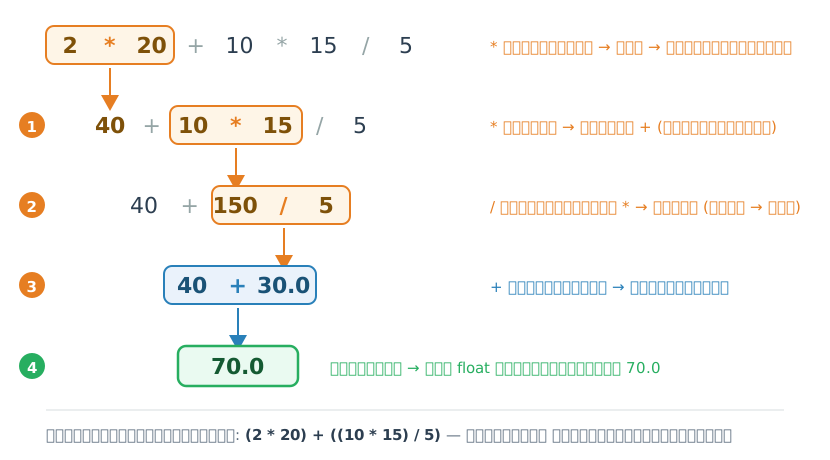
เห็นภาพ: 2 * 20 + 10 * 15 / 5 ทำงานทีละขั้น
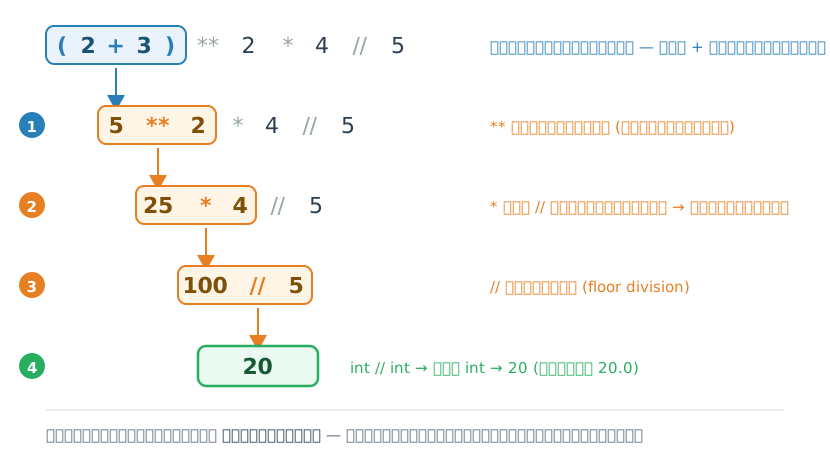
เห็นภาพ: (2 + 3) ** 2 * 4 // 5 ทำงานทีละขั้น
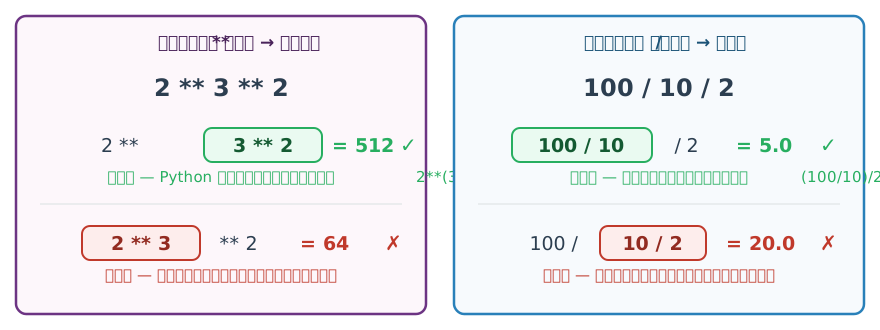
Associativity: จับคู่จากทางไหน
เมื่อ operator ระดับเดียวกัน อยู่ติดกัน — ตัวไหนจับคู่ก่อน?
Tip
** เป็นตัวเดียวในหมู่คณิตศาสตร์ที่จับคู่ ขวา → ซ้าย — จำไว้ให้ดี
โจทย์ #26
กำหนด \(a=20, b=10, c=15, d=5\) — คำนวณในใจก่อน
a + b * c / d= ?(a + b) * c / d= ?a + b * (c / d)= ?a + (b * c) / d= ?
โจทย์ #27
กำหนด \(y = -3x - \dfrac{2}{10^2}\) — จงหา \(y\) เมื่อ \(x = 5\)
วิธีคิด
- assign ค่าให้ตัวแปร
x - assign ค่าให้ตัวแปร
y - แสดงผลคำนวณด้วยคำสั่ง ด้วย
print()
จากวิธีคิดข้างบน ถ้าสลับขั้นที่ 1. กับ 2. จะมีผลกับการรันโค้ดยังไง?
Math Module 🧮
ชุดคำสั่งคณิตศาสตร์ — import math
math module — ภาพรวม
- การคำนวณทางคณิตศาสตร์ที่ซับซ้อนทำได้ยากด้วย
operatorพื้นฐาน - Python เตรียมชุดคำสั่ง (หรือฟังก์ชัน) ในการคำนวณที่จำเป็นทางคณิตศาสตร์เพิ่มเติมให้ผู้พัฒนาโปรแกรมได้เรียกใช้งาน
- คำสั่งเหล่านี้ถูกจัดเตรียมรวมกันไว้ในโมดูล (module) ที่ชื่อว่า
math - ก่อนจะใช้งานคำสั่งเหล่านี้เราต้อง
importโมดูลเข้าสู่โปรแกรมเสียก่อน
Note
ในการทำงานจริง เรา import module เข้ามาเพียงครั้งเดียวก็สามารถใช้งานต่อได้ ไม่จำเป็นต้อง import ทุกครั้ง
math — ฟังก์ชันและค่าคงที่
ฟังก์ชัน
math.sqrt(x)— \(\sqrt{x}\)math.sin(x),cos(x),tan(x)math.log(x),log2(x),log10(x)math.factorial(n)— \(n!\)math.ceil(x)— ปัดขึ้นmath.floor(x)— ปัดลง
ค่าคงที่
math.pi— \(\pi = 3.14159...\)math.e— \(e = 2.71828...\)
แปลงมุม
math.degrees(rad)— rad → degreemath.radians(deg)— degree → rad
โจทย์ #28
คำนวณ \(\sqrt{25}\) — ทำได้กี่วิธี?
โจทย์ #29
คำนวณพื้นที่วงกลมที่มีรัศมี 10 หน่วย
\[area = \pi r^2\]
โจทย์ #30
แปลงมุม 2 radian เป็นหน่วย องศา (degree)
โจทย์ #31
แปลงมุม 60 องศา เป็นหน่วย radian
โจทย์ #32
ให้คำนวณค่าของ ① \(\sin\) ของมุมขนาด 30 เรเดียน, ② \(\cos\) ของมุมขนาด 60 องศา
Warning
sin, cos, tan รับค่าเป็น radian เสมอ!
ทำไม cos(60°) ได้ 0.5000000000000001?
cos(60°) ควรได้ 0.5 พอดี แต่ได้ 0.5000000000000001 — นี่คือ floating-point error ไม่ใช่บั๊ก
- คอมพิวเตอร์เก็บ
floatเป็นเลขฐานสอง — ทศนิยมบางค่า (เช่น0.1,0.3) แทนแบบตรงเป๊ะไม่ได้ จึงมีค่าคลาดเคลื่อนจิ๋ว ๆ ติดมา - หลักท้าย ๆ ไม่น่าเชื่อถือ — อย่ายึดตัวเลขทุกหลักตามหน้าจอ
- อย่าเทียบ
floatด้วย==—0.1 + 0.2 == 0.3ได้False!
Warning
เป็นเรื่องปกติของ ทุกภาษา (มาตรฐาน IEEE 754) — เวลาแสดงผลให้ปัดด้วย round() หรือจัดรูปด้วย f-string f'{x:.2f}' (เรียนใน Module 3b)
ตัวอย่าง math เพิ่มเติม
Factorial — \(4! = 1 \times 2 \times 3 \times 4\)
Summary 🎯
สรุป Module 3a 🎉
ตัวแปรและชนิดข้อมูล
str,int,float,bool- ตรวจสอบด้วย
type() - แปลงด้วย
int(),float(),str()
Operators
- Arithmetic:
+-*///%** - Comparison:
><==!= - Logical:
andornot - Assignment:
=+=-=
Math Module
import mathsqrt,sin,cos,pi, …ceil,floor,factorial
Note
ต่อ Module 3b: Input / Output และ f-string 👉
🏠 259201 — Module 3a | ภาควิชาวิศวกรรมคอมพิวเตอร์ คณะวิศวกรรมศาสตร์ มหาวิทยาลัยเชียงใหม่